
Etsy Listing Photos That Sell: What to Show in All 10 Slots
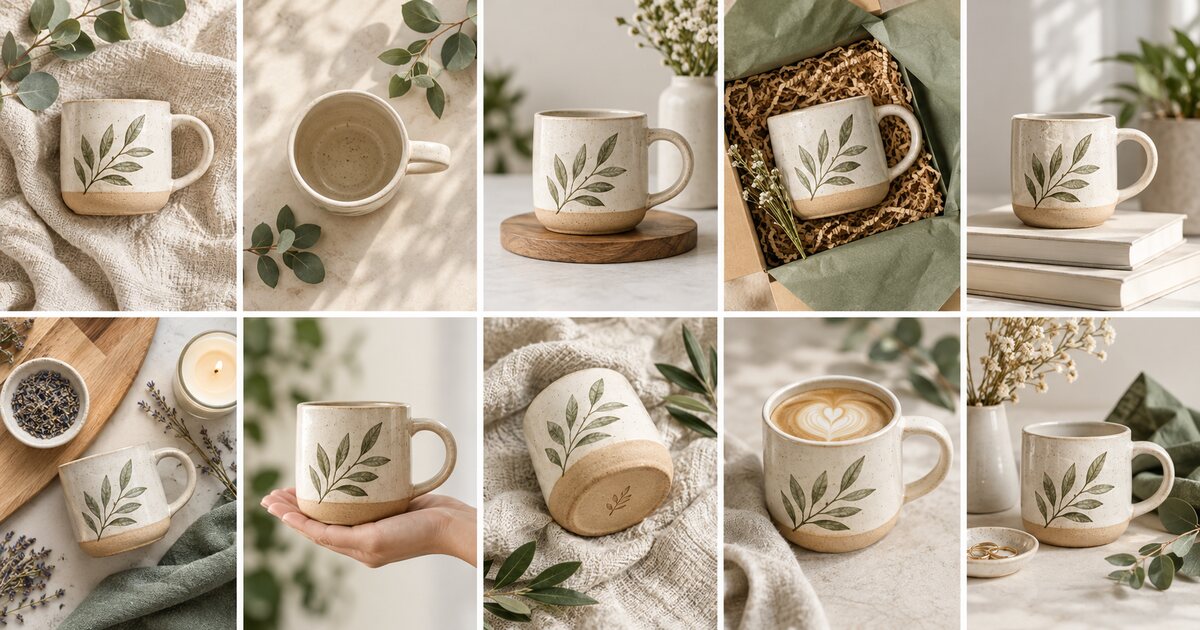
Ten Slots, Ten Answers
More photos do not automatically create more sales. Useful photos do. Treat each slot as an answer to one buyer question, so your listing becomes a visual product demonstration rather than a gallery of similar angles.
A Strong Ten-Image Sequence
Start with the clear hero image. Add an alternate angle, close-up detail, in-use lifestyle image, scale reference, color or variation chart, back or underside view, packaging image, process or materials image, and a final care, fit, or dimensions graphic.
Adapt the sequence to your category. Jewelry needs scale and clasp detail. Apparel needs fit and size guidance. Digital downloads need previews and file information. Let buyer risk decide which image comes next.
Keep Graphics Simple
Text overlays can clarify dimensions or personalization, but they should support the product image, not replace it. Use high contrast, short phrases, and generous spacing. A crowded graphic feels like work for the buyer.
Audit for Repetition
Put your images in order, then remove any that answer the same question. Replace repetition with proof: a close-up, a scale reference, or a real-life context shot. Every image should earn its place.
How ShopBoostly Helps
ShopBoostly flags listing quality gaps so you can see where visual improvements support better conversion. Pair the score with this sequence to turn an empty image slot into useful buyer proof.
Related Articles
Etsy Product Photography: A Practical Guide to Photos That Sell
Build a simple Etsy photo system that earns clicks, answers buyer questions, and makes your products feel worth buying.
How to Write Etsy Product Descriptions That Convert
Turn product details into buyer confidence with an Etsy description structure that is clear, specific, and easy to scan.
Etsy Listing Videos: What to Film and Why They Increase Confidence
Create short Etsy listing videos that show texture, scale, movement, and real product details buyers cannot get from still photos.
Ready to boost your Etsy shop?
Try ShopBoostly and start optimizing your listings today.
Join early access